A currency for each account
Organize cash, savings and cards with the currency that belongs to each account. Identify each balance without losing the context of where it belongs.

MONI / MULTIPLE CURRENCIES
When you track expenses in colones and dollars, or accounts in more than one currency, the overall picture can take work. Moni helps you organize those accounts and view an overview in a main currency.
Download on the App StoreFor iPhone and iPad · Free download with in-app purchases
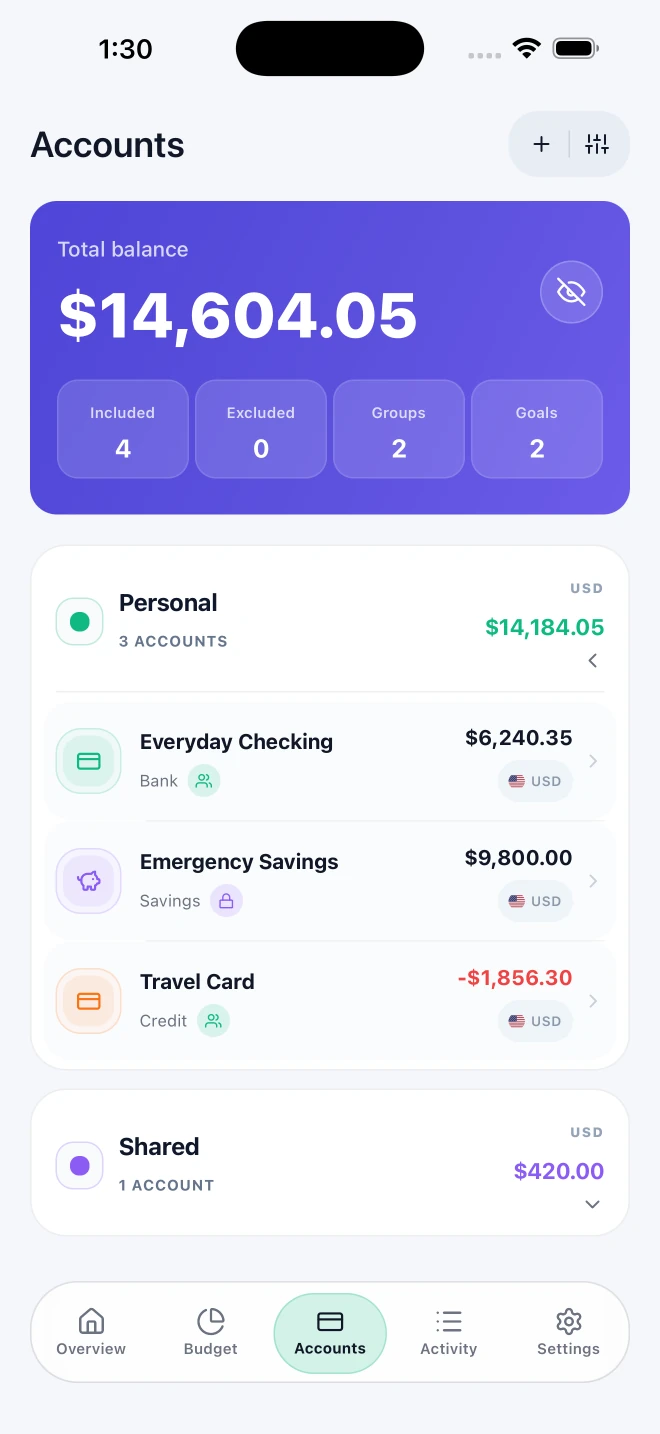
Organize cash, savings and cards with the currency that belongs to each account. Identify each balance without losing the context of where it belongs.
Keep accounts in different currencies, such as an everyday spending account in CRC and a savings account in USD. Currency codes help you distinguish amounts as you review accounts.
Choose a main currency for your overview. Moni uses available exchange rates to present the amounts; each account balance keeps its own currency.
This overview helps you interpret the information you record. Moni does not exchange currencies or move money between banks: you maintain your relationship with your accounts and financial services.
LET’S CLEAR THINGS UP
Yes. Organize accounts in different currencies and identify each balance by its currency code, such as CRC or USD.
The main currency is used to present an overview. Each account keeps its own currency.
Amounts presented using available exchange rates help you organize your information. Actual currency exchanges and money transfers happen outside Moni with your chosen provider.
A LITTLE MORE CLARITY, STARTING TODAY.
Available for iPhone and iPad